

This week, I finished up with my code for my data play project!
I decided to remove my background rain animation, as I didn’t like how it looked when animated, I also didn’t feel as though it captured the feeling of ‘more precipitation’ as well as my ground-rain-div did.
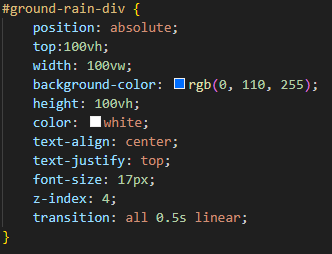
to replace this rain animation, I gave my ground rain bar a transition property so that when it changed it would be animated as it moves, to give a smooth feeling of rising rain. This transition property has been very aesthetically pleasing, I added it to my arrow as well. (I intentionally made the arrow transition faster than the ground-rain-div, this is because I wanted the rising of my rain to be more gradual in order to grab the user’s attention, while I wanted my arrow to be faster and not stay in the middle of transitioning its animation as long.) I absolutely love the transition feature and I will use it a lot in the future for simple moving elements that I have on a webpage.
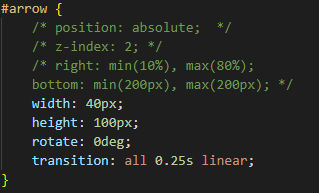
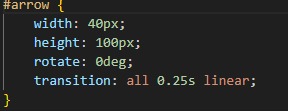
I changed my arrow position, and also removed its absolute position since it was stretching and positioned weirdly when I shrunk my screen size. I also put it within a flexcolumn and container class so that it would line up well next to my vertical and horizontal sliders.
Below my arrow I have a span within my div that says how many degrees the wind direction is (this is placed below my arrow), I have done this for clarity reasons incase a user wants a more precise value for wind direction than just an arrow pointing in a direction that the human eye can only estimate.
I also changed my windspeed leaf moving calculation because it was not functioning at km per hour, it was instead calculating as m / s. This made my calculation work incorrectly so it needed to be changed.
In addition to this, I worked on my code documentation, which was belated as my code wasn’t yet finished. It’s done now, In the future, I’d try to completely finish it earlier as it will make my work a lot less stressful and will free me up to allow me more time to review and rewrite the other parts of my written work.
I added a HTML diagram to my code documentation, which I hope illustrates my code structure well. I found it beneficial to make as it helped me realize why some of my elements weren’t positioned in the way I wanted them to be. I find it to be a good way at breaking down a HTML document.
Data play part 1
I worked on doing some small touch ups on my data play task (part 1), I did a lot of paraphrasing to begin with, and realised that I rambled on about some topics which could have been condensed, so I did some summarizing (where I removed unneeded words, or any repetition). After doing some rephrasing of sentences and words on top of this, I feel as though my work became a lot more neat and readable.